

Want to write blog posts quickly and well? Use a clear outline, smart AI prompts, SEO-first headings, and a short editing checklist. Follow the steps and plan your idea, generate content in focused chunks, optimize for SEO, and polish for humans and voice search. This method helps you publish more posts without losing quality.
Introduction: Why Speed and Quality Matter Together
Every blogger, marketer, or content creator dreams of publishing faster without losing the quality and the polish that makes readers stay. You’ve probably asked yourself: “How can I write blog posts faster without them sounding robotic or shallow?”
The truth is that speed doesn’t kill quality, but poor systems do. When you use the right plan, tools, and SEO-backed process, you can write blog posts that are both fast and deeply useful. This part of the guide will show you how to build that foundation, from choosing your topic to creating a smart structure that cuts writing time in half.
Let’s start by understanding why mastering the skill to write blog posts efficiently can completely change your content ranking.
Why Learning to Write Blog Posts Faster Is a Superpower
In today’s digital world, content is everything. Businesses, brands, and creators rely on blogs to connect with their audience, rank on Google, and earn trust. But with millions of posts published daily, only the ones that are consistent and high-quality stand out.
Speed helps you win in two ways:
- You publish more often: The more content you release, the more chances you have to rank for different keywords.
- You stay current: Trends change fast. If you can write blog posts quickly, you can respond to new trends or topics before competitors do.
- You reduce burnout: Having a repeatable system means less decision exhaustion and more creative focus.
The key is not typing faster, but thinking smarter. Once you master a repeatable method, every post becomes easier to plan, write, and optimize.
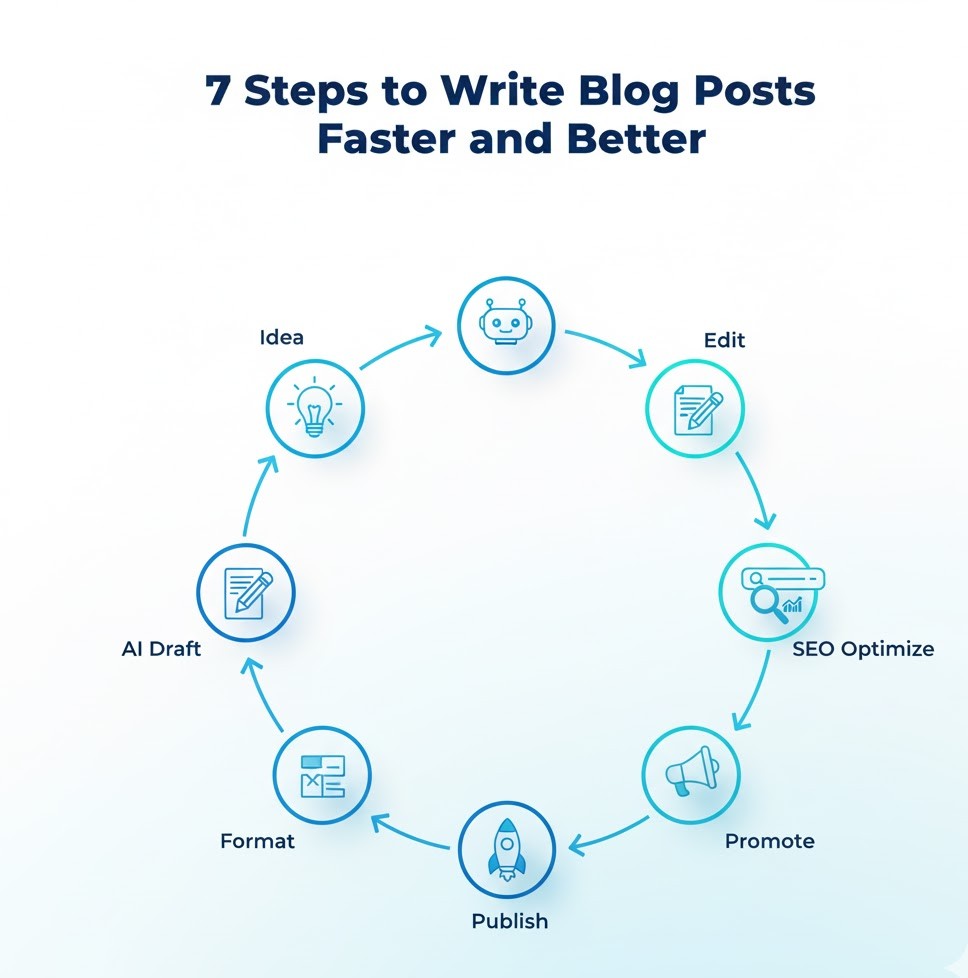
Step 1: Choose the Right Topic and Intent
Before you start writing anything, the first and most important step is understanding what your audience truly wants. Every successful article always starts with a clear topic and a defined search intent.
1.1 Understand Search Intent
When people search for “how to write blog posts,” they are not just looking for abstract theory; all they want are practical and actionable steps. So, your post should focus on teaching, not just explaining.
There are four main types of search intent:
- Informational: People want to learn something. (e.g., “how to write a blog post”)
- Navigational: They’re looking for a specific website or resource.
- Transactional: They want to buy something.
- Commercial: They’re comparing options before buying.
When you write blog posts, make sure your content fits the informational or commercial intent if your goal is education, lead generation, or brand trust.
1.2 How to Pick the Perfect Topic Fast
Here’s a 5-minute topic selection process:
- Start with your main keyword — for example, “write blog posts.”
- Type it into Google and look at People Also Ask questions.
- Check the autocomplete suggestions and related searches at the bottom.
- Use a free tool like AnswerThePublic or AlsoAsked.com to gather ideas.
- Pick a topic that matches your audience’s pain point — for example:
“How to write blog posts faster using AI” or
“How to write blog posts that rank without being an SEO expert.”
You now have a topic that both your readers and search engines will love.
Step 2: Research Keywords the Smart Way
Keyword research used to take hours. Today, you can do it in minutes if you know what to look for. You only need one main keyword (e.g., “write blog posts”) and a few supporting terms that reinforce your topic.
2.1 Find Keywords That Matter
Here’s how:
- Search your main keyword in Google.
- Open the top 3 ranking articles.
- Look at their subheadings and note common phrases.
- Identify related terms like “blog writing,” “content creation,” “SEO blog post,” and “how to write a good blog post.”
These supporting keywords help Google understand your topic contextually, it’s part of semantic SEO, which improves visibility in AI-driven results like Google SGE and ChatGPT answers.
2.2 Avoid Keyword Stuffing
Keyword stuffing can hurt your ranking. The best strategy is natural placement. For instance:
- Once in your title.
- Once in the first paragraph.
- A few times in subheadings.
- Naturally, within sentences where it fits.
Aim for clarity first, and Google will reward you for it.
Tips: Keyword density should be 1 to 3% or 5 to 10 keywords for a 1000-word article.
Step 3: Build an Outline That Writes Itself
Here’s where many writers waste time: they start typing without a roadmap. When you write blog posts, the outline is your GPS. It keeps you focused, organized, and consistent.
3.1 Why an Outline Speeds Up Writing
- You avoid writer’s block because every section already has a goal.
- You should always stay consistent with your tone and message.
- You can delegate or use AI for sections without confusion.
3.2 The 10-Minute Outline Framework
Here’s a simple framework you can use for any blog post:
H1: Main Title (with Keyword)
Example: AI + SEO Hacks: How to Write Blog Posts 10x Faster Without Losing Quality
Featured Snippet: A short paragraph that directly answers the search intent.
H2: Why this topic matters
Explain the “why” behind your guide.
H2: Step 1, Step 2, Step 3…
Each step becomes a section with a clear takeaway.
H2: Common mistakes to avoid
Address user pain points or misconceptions.
H2: Tools, tips, or resources
Give actionable value.
H2: FAQs or Conclusion
Answer common questions and wrap up.
This layout is easy for readers, search engines, and even voice assistants to follow.
Step 4: Collect Tools and Resources Before Writing
Preparation saves hours later. Before you start drafting, gather your resources and research, examples, and tools, so you never stop mid-writing.
4.1 Tools to Help You Write Blog Posts Faster
- Google Docs or Notion: For easy drafting and collaboration.
- Grammarly / Hemingway App: To polish readability.
- Rank Math or Yoast SEO: To check keyword usage and meta optimization.
- ChatGPT or Gemini: To brainstorm ideas or expand outlines.
- SurferSEO / NeuronWriter: To ensure semantic keyword coverage.
4.2 Templates for Consistency
Create reusable templates:
- Blog post outline template
- SEO optimization checklist
- CTA (call to action) template
- Headline variations sheet
When you reuse templates, you save thinking time and can focus purely on writing.
Step 5: Plan Your Writing Schedule
Writing fast is about structure, not speed. Use a focused, time-blocked tactic.
5.1 The 90-Minute Writing Sprint
Divide your writing session into phases:
- 15 minutes: Finalize your outline and keywords.
- 45 minutes: Write in uninterrupted flow.
- 15 minutes: Edit and refine sentences.
- 15 minutes: Optimize SEO and meta tags.
In just 90 minutes, you can write blog posts that normally take half a day.
5.2 Create a Writing Habit
Set a regular writing time may be in the early morning or quiet evening, and protect it. Consistency builds speed. Over time, your brain will adapt to producing content during those focused hours.
Step 6: Develop the Right Mindset
You don’t need to be a professional writer to write blog posts that rank. You just need the right mindset and a balance of creativity and discipline.
6.1 Focus on Value, Not Perfection
Don’t aim for perfect sentences in your first draft. The goal is to get your ideas on paper. Perfection happens during editing.
6.2 Learn from Analytics
Once your posts go live, use data to improve:
- Which topics perform best?
- Which headlines get more clicks?
- Which structure keeps readers longer?
Every post is feedback for your next one.
Step 7: Understand How AI Fits In
AI is your co-pilot, not your ghostwriter. The secret is using it strategically, for ideation, outlines, and time-saving drafts — while keeping your unique voice intact.
7.1 How to Use AI Efficiently
- Idea generation: Ask AI to list blog ideas based on your niche.
- Outline creation: Feed your main keyword and let AI structure your subtopics.
- Content expansion: Use prompts like, “Write a 200-word paragraph on [subtopic] in a friendly, expert tone.”
- Editing: Ask AI to shorten, simplify, or clarify sentences.
7.2 What to Avoid with AI
- Copy-pasting full AI drafts.
- Letting it write intros or conclusions without editing.
- Using it for personal opinions or data-based claims.
The best strategy: AI drafts, you refine.
Step 8: Create a Repeatable Writing Workflow
Once you have a system, you can write faster every time. Here’s a workflow template you can repeat for every new post.
- Choose topic & intent.
- Research keywords (main + LSI).
- Build a detailed outline.
- Gather tools and resources.
- Draft section by section (AI-assisted if needed).
- Edit for clarity and tone.
- Optimize for SEO (title, meta, headers, images).
- Publish and promote.
- Track performance and update later.
Follow this loop consistently, and your writing time will drop by 70% without sacrificing depth.
Step 9: Add the Human Touch
Even if you use AI and templates, remember: readers connect with you. Personal stories, examples, and insights build trust, and Google’s E-E-A-T (Experience, Expertise, Authoritativeness, Trustworthiness) algorithm values exactly that.
- Add your experience or client story.
- Mention lessons learned from a real project.
- Use “you” and “we” to sound personal and engaging.
The more authentic your writing feels, the better your post performs, both in search results and engagement.
Step 10: Measure and Improve
Once you’ve published a few posts, track metrics to refine your process:
- Average writing time per post: Are you getting faster?
- Traffic growth: Which topics attract more readers?
- Bounce rate & dwell time: Are readers staying on your page?
- Search rankings: Are you climbing for “write blog posts” and related terms?
Use insights to adjust your outline structure, keyword choices, or tone.
Drafting and Optimizing Blog Posts 10x Faster (Step-by-Step)
Writing doesn’t have to be slow. With the right system, you can write blog posts in half the time, and still produce content that’s engaging, SEO-optimized, and trustworthy.
Let’s go step-by-step through how to turn your outline into a finished article using AI + SEO hacks that professionals rely on.
Step 1: Draft Each Section Separately (Don’t Write in One Go)
One major reason writers get stuck is trying to perfect everything in one sitting. The best way to write blog posts faster is to break your content into small, clear sections, just like your outline.
Treat every H2 or H3 as a micro-task. When you focus on one small piece at a time, you reduce overwhelm and improve clarity.
1.1 Why This Works
- Your brain stays focused on one topic.
- AI can help more precisely when you give clear instructions.
- You can edit in small batches later.
Example:
If your outline has 6 main steps, spend 15 minutes drafting each one. That’s approximately one to one and a half hours for a complete first draft, which is faster than most people write one intro.
1.2 Use the “One Section at a Time” Formula
- Write your heading.
- Use a prompt (if you’re using AI) to expand that section.
- Edit the result for tone and keyword balance.
- Move to the next heading.
In the end, you’ll have a clean, sectioned draft ready for polishing.
Step 2: Use AI as a Smart Assistant (Not a Replacement)
AI tools can help you write blog posts much faster, but only when you use them with precision. Think of AI as a smart assistant who follows your direction, not a ghostwriter that replaces your ideas.
2.1 How to Write Prompts That Work
Generic prompts lead to generic writing. Be specific about what you want.
Here’s a structure that works for almost any section:
Prompt Example:
“Write a 150-word paragraph explaining [subtopic]. Use a friendly, professional tone, short sentences, and include the phrase ‘write blog posts’ naturally once. Make it sound human and conversational.”
Add context:
- Who is the audience?
- What level of detail do you want?
- What is the main keyword or phrase?
The more details you provide, the better your AI output becomes.
2.2 Example of a Good vs. Bad Prompt
Bad Prompt:
“Write about blog writing.”
– Too broad, no direction, results in filler content.
Good Prompt:
“Write a short section on why editing matters when you write blog posts. Explain in simple terms for beginners. Add one example and one tip.”
– Clear, detailed, and aligned with your post’s structure.
Step 3: Keep the Human Touch in Every Paragraph
Even if AI writes 50% of your first draft, readers must still feel your voice. The best-performing blog posts mix structure with authenticity.
3.1 Add Personal Perspective
After generating a draft, read each paragraph and add:
- A quick opinion (“In my experience, this step saves hours.”)
- A real-world example.
- A transition line that reflects your voice.
These micro-edits make the content sound human and engaging, the main key factor for Google’s E-E-A-T and Helpful Content standards.
3.2 Use Simple, Conversational English
Avoid jargon unless necessary. You’re writing for humans and AI systems, both value clarity.
Aim for sentences under 20 words and paragraphs under 100 words.
For example:
“You don’t need fancy tools to write blog posts. A clear outline, a timer, and one writing app are enough.”
Step 4: Use Templates to Speed Up Drafting
Templates are the secret weapon of professional writers. They allow you to write blog posts consistently, quickly, and with less decision fatigue.
4.1 Sample Blog Post Template
Intro Template:
Hook the reader with a relatable problem.
State the benefit or promise.
Preview what they’ll learn.
Body Template:
Step 1: What to do
Step 2: How to do it
Example or Tip
Summary line with a call to continue reading.
Conclusion Template:
Summarize 3 key takeaways.
End with a motivating line or CTA.
4.2 Why Templates Improve Quality
Templates make structure automatic, you focus only on ideas and examples. Even AI responds better to clear, repeatable patterns, giving you higher-quality output every time.
Step 5: Optimize While You Write
One of the biggest time-savers is integrating SEO optimization during writing itself, not after finishing the article.
This means writing naturally with keywords and structure in mind from the start.
5.1 Use the Keyword “Write Blog Posts” Naturally
Here’s a quick placement checklist:
- Once in the title.
- Once in the intro paragraph.
- Once in at least two H2 headings.
- Once near the conclusion.
- Sparingly within sentences.
Example:
“When you learn to write blog posts efficiently, you unlock the power to publish more without sacrificing quality.”
5.2 Add Related Keywords (Semantic SEO)
Add LSI keywords like:
- How to write a blog post
- Blog writing tips
- SEO content writing
- Blog post structure
- AI blog writing tools
This helps AI answer engines (ChatGPT, Gemini, Perplexity) and Google’s SGE understand your content better.
Step 6: Write for AI and Voice Search Together
Modern SEO is no longer text-only. Tools like Google SGE and voice assistants read answers directly from blog posts. To rank there, your structure must be voice-friendly.
6.1 How to Make Content Voice Search Ready
- Use questions and short answers (as in FAQs).
- Keep sentences below 15 words.
- Add summary lines under subheadings.
- Start answers directly (no long intros).
Example:
Q: How can I write blog posts faster?
A: Create a template, use AI for drafts, and edit later for clarity.
6.2 Format for AI Answer Engines
- Use clear H2 and H3 structure.
- Use bullet lists for steps.
- Include data or short examples that support your advice.
This helps your post appear in featured snippets and AI summaries, giving you visibility beyond standard search results.
Step 7: Use Short, Action-Oriented Paragraphs
Long walls of text slow readers and reduce engagement. When you write blog posts, aim to make every line easy to scan.
7.1 The 3-3 Rule
- No paragraph longer than 3 lines.
- No section without at least 3 short sentences.
- Use 3 examples or subpoints per topic.
This keeps your content readable for both screens and voice systems.
7.2 Add Micro-Headings
Break long H2s into smaller H3s. Example:
- H2: Step 3 — Build Your Outline
- H3: Why Outlines Save Time
- H3: Quick Outline Formula
This helps readers navigate faster, and helps AI parse your content better.
Step 8: Use Data and Examples for Authority
To make your content trustworthy, include facts, stats, or short examples.
Search engines value credibility, and real-world context makes your writing helpful.
Example:
“According to Orbit Media’s 2024 Blogging Survey, bloggers who update old posts and use structured outlines are 70% more likely to see higher traffic.”
8.1 Ways to Add Authority
- Link to reputable sources (HubSpot, Ahrefs, SEMrush).
- Use case studies or mini-examples.
- Add quotes or insights from experts.
Step 9: Edit as You Go (Smart Editing Process)
Traditional editing happens after writing, but smart editing happens in layers as you go.
9.1 Quick In-Process Edits
After finishing each section:
- Read it aloud.
- Remove filler words (actually, really, very).
- Check for one clear idea per paragraph.
- Ensure the keyword fits naturally.
9.2 Final Edit Pass
Once your draft is done:
- Use Grammarly or Hemingway to check readability.
- Replace repeated words with synonyms.
- Verify transitions are smooth.
- Ensure all claims are factual.
Remember: editing is not rewriting — it’s tightening.
Step 10: On-Page SEO Optimization Checklist
Once your draft reads smoothly, it’s time to optimize for on-page SEO.
Here’s a step-by-step checklist you can apply to every blog post.
- SEO Title: Includes your main keyword early.
Example: “AI + SEO Hacks: How to Write Blog Posts 10x Faster Without Losing Quality.” - Meta Description: 150–160 characters, includes keyword and benefit.
- Headings: Contain variations of your keyword.
- Internal Links: Link to 2–3 relevant posts.
- External Links: Add at least one credible source.
- Images: Use descriptive alt text like “AI tools to write blog posts faster.”
- Readability: Grade 5–7 reading level.
- Word Count: Minimum 1,500 words for in-depth ranking.
Doing these optimizations while writing prevents tedious post-edit SEO work later.
Step 11: Use AI for Revisions and Style Polishing
Once your first draft is ready, use AI to edit, not create.
Here’s how:
- Ask AI to “shorten sentences without losing meaning.”
- Request a “professional but conversational tone.”
- Check if it maintains the keyword balance.
- Use it to create alternate headlines or intros.
AI excels at consistency and tone alignment — use it to polish your already original content.
Step 12: Add Internal and External Links Naturally
Linking is one of the simplest ways to improve SEO and credibility.
12.1 Internal Links
Add links to related blog posts within your website.
Example:
“If you want to learn how to research faster before you write blog posts, check out our guide on keyword tools.”
12.2 External Links
Reference credible sources that add trust.
Avoid linking to competitors; instead, use high-authority sites like HubSpot, Forbes, or Ahrefs.
Step 13: Add Visuals to Support the Text
Images make your content more engaging and SEO-friendly.
Use 1 image every 300–400 words to break text flow.
13.1 Types of Visuals
- Screenshots of tools.
- Infographics summarizing your steps.
- Step-by-step diagrams.
- Before-and-after content examples.
Always include alt text describing the image using related keywords (e.g., “example of how to write blog posts using AI tools”).
Step 14: Write the Perfect Intro and Conclusion
The intro and conclusion are the most read parts of your post — and what Google often shows in snippets.
14.1 Intro Formula
- Start with a relatable problem.
- Offer a promise or solution.
- Include your main keyword once.
- Preview what readers will learn.
Example:
“If you’ve ever struggled to write blog posts fast without losing quality, you’re not alone. In this guide, you’ll learn a simple AI and SEO-based process to write content that ranks and resonates.”
14.2 Conclusion Formula
- Recap your main ideas.
- Reinforce your key promise.
- Include one actionable takeaway.
- Add a call to action (e.g., download a checklist, subscribe, etc.).
Example:
“Now you know how to write blog posts faster using AI and SEO. Start small, follow the steps, and you’ll soon publish high-quality content in half the time.”
Step 15: Final Pre-Publish Checks
Before you hit publish, run through this checklist:
- Headings are in proper order (H1 > H2 > H3).
- Keyword appears naturally throughout.
- Images include alt text.
- Links are tested.
- Meta data is filled out.
- Grammar and tone are consistent.
Turning Your Blog into a Ranking Machine
Now that you know how to plan, draft, and optimize efficiently, it’s time to go beyond just “good writing.”
This final section teaches you how to make your blog visible across every major search system, from traditional Google to AI-driven engines like ChatGPT, Perplexity, and Gemini.
The truth is: today, ranking isn’t just about keywords. It’s about understanding how AI reads your content and writing in a way that both machines and humans love.
Let’s dive into how to make every post work harder for you.
Step 1: Optimize for Google’s SGE and AI Answer Engines
1.1 What Is Google SGE?
Google’s Search Generative Experience (SGE) displays AI-generated summaries before the usual results. To get featured there, your content must:
- Provide concise, factual answers.
- Use structured headings (H2/H3).
- Contain summarized takeaways within sections.
- Be written in natural language (suitable for voice reading).
1.2 How to Format for AI Crawlers
AI engines like ChatGPT and Perplexity use language models that prefer:
- Direct, short answers under subheadings.
- Step-based formatting.
- Lists, bullet points, and mini FAQs.
Example:
Q: How do I write blog posts faster?
A: Use an outline, leverage AI tools for drafting, and edit in short, timed sessions.
1.3 Add “Answer Paragraphs”
At the end of every main section, add a 2–3 sentence summary that clearly answers the implied question.
These are often picked up as AI snippets and featured responses.
Example:
“To write blog posts faster, create structured templates, delegate drafting to AI tools, and focus on editing for quality rather than perfection.”
Step 2: Build an AI + SEO Workflow System
A workflow system is the key to writing 10x faster. It ensures you produce high-quality content every time without creative burnout.
2.1 The 3-Stage Workflow
- Research & Outline (AI-assisted)
Use tools like Google Trends, SEMrush, or ChatGPT for content gaps. - Drafting (Human + AI hybrid)
Write the first 70% using AI and finalize tone manually. - Optimization (SEO pass)
Add headings, internal links, schema, and final keyword tuning.
2.2 Batch Writing for Efficiency
Instead of creating one blog at a time, batch your workflow:
- Monday: Outline 3 topics.
- Tuesday: AI-assisted drafts.
- Wednesday: Human edit + SEO check.
- Thursday: Add visuals and publish.
This process lets you write blog posts consistently — 3–4 per week instead of one.
Step 3: Master AI Editing for Natural Tone
AI can polish your writing better than most editing tools — if you prompt it correctly.
3.1 Smart Editing Prompts
Use these prompts after your draft:
- “Rewrite this paragraph for clarity and flow.”
- “Simplify this for a fifth-grade reading level.”
- “Rephrase this to sound natural and human.”
- “Adjust tone to be professional yet friendly.”
3.2 Avoid AI Overuse
Always review AI edits. Too much AI rewriting can create robotic or repetitive phrasing.
Keep your personality intact. A simple 20% human touch — like a personal note or example — is what makes content memorable and trusted.
Step 4: Leverage Schema Markup for Higher CTR
Schema markup helps Google understand your blog’s structure.
Adding structured data increases your chances of appearing in rich results or FAQ boxes.
4.1 Types of Schema to Add
- Article Schema: For blog posts.
- FAQ Schema: For question-answer sections.
- How-To Schema: For step-by-step guides.
Tools like Rank Math or Yoast SEO Premium make adding schema effortless — even without coding skills.
4.2 Example (FAQ Schema Snippet)
{
“@context”: “https://schema.org”,
“@type”: “FAQPage”,
“mainEntity”: [{
“@type”: “Question”,
“name”: “How can I write blog posts faster?”,
“acceptedAnswer”: {
“@type”: “Answer”,
“text”: “You can write blog posts faster by using AI tools for drafting, outlines for structure, and editing systems for quality control.”
}
}]
}
This simple code increases your chance of appearing in voice results and “People Also Ask” boxes.
Step 5: Repurpose Blog Content Across Channels
Your blog is just the beginning. Smart marketers repurpose every article into multiple assets — saving hours while increasing visibility.
5.1 Turn Blog Posts into:
- LinkedIn articles or carousels.
- Medium stories.
- YouTube video scripts.
- Newsletter editions.
- Instagram captions.
Example:
Take your blog on “How to Write Blog Posts Faster” and break it into:
- 10 short tips for Instagram.
- A mini-guide for LinkedIn.
- A video walkthrough for YouTube.
Each version drives traffic back to your main article.
5.2 Why Repurposing Matters
Repurposing gives your content a longer life, better backlinks, and a cross-platform SEO presence.
AI-driven engines also recognize repeated topics across the web — boosting your authority signal.
Step 6: Make Content Voice Search Friendly
With over 50% of searches now voice-based, optimizing for spoken language is crucial.
6.1 Voice SEO Tips
- Write in a Q&A format.
- Keep answers under 40 words.
- Use conversational phrasing (“How do I…”, “What is…”).
- Include transition words like “Here’s how,” or “Let’s see.”
6.2 Example Voice-Optimized Snippet
Question: “How do you write blog posts that rank in voice search?”
Answer: “Use short, direct sentences, natural phrasing, and make sure every answer sounds like you’re speaking to a person, not a bot.”
Step 7: Track and Update Regularly
SEO isn’t one-time. Blogs that rank #1 are updated consistently.
7.1 Update Cycle
- Every 3 months: Refresh statistics and examples.
- Every 6 months: Add new insights or tools.
- Every 12 months: Rewrite sections for trends.
7.2 Why It Works
Google values freshness — and AI models like Gemini and Perplexity fetch the most recently updated data first.
Step 8: Build Topical Authority Around “Write Blog Posts”
You’ll rank faster if your blog consistently covers related topics under one niche.
8.1 Create Supporting Content
Write about:
- Blog writing templates
- SEO blog strategies
- AI content writing tips
- How to choose blog post keywords
Link all these posts together internally. This builds topical authority and signals Google that your site is a go-to resource for “how to write blog posts.”
Step 9: Add Author Credibility (E-E-A-T)
Google’s E-E-A-T (Experience, Expertise, Authoritativeness, and Trustworthiness) is now a major ranking factor.
9.1 Quick E-E-A-T Enhancers
- Add an author bio with credentials.
- Include sources for claims.
- Mention personal experience when possible.
- Add testimonials or references if available.
The more credible your content appears, the better its ranking longevity.
Step 10: Publish and Promote Strategically
Even great content needs visibility.
After you write blog posts and publish them, use smart promotion to drive organic traction.
10.1 Post-Publishing Checklist
- Share on LinkedIn, X (Twitter), and Facebook.
- Submit to Google Search Console immediately.
- Repurpose snippets for Reels or Shorts.
- Add internal links from older posts.
- Encourage newsletter readers to engage.
This multi-channel push tells Google and AI crawlers that your post is valuable and active.
Step 11: Track Metrics That Matter
To keep improving, monitor key performance metrics:
| Metric | Why It Matters |
| CTR (Click-Through Rate) | Shows if your titles and meta work |
| Average Time on Page | Indicates reader engagement |
| Scroll Depth | Measures readability |
| Keyword Positions | Tracks ranking improvement |
| Voice Search Queries | Finds how AI and assistants pick your content |
Use tools like Google Analytics, Search Console, and Ahrefs to keep optimizing.
15 FAQs (Optimized for Voice Search, SGE, and AI Engines)
1. How can I write blog posts faster without losing quality?
Plan ahead with outlines, use AI tools for drafting, and edit each section separately to maintain clarity.
2. What’s the best AI tool to write blog posts?
ChatGPT, Jasper, and Copy.ai are top-rated for generating drafts quickly with consistent tone.
3. How often should I post blogs for SEO growth?
Publishing 2–3 times per week builds authority faster and keeps your site active in search crawlers.
4. How long should a blog post be for SEO?
Aim for 1,500–2,500 words for in-depth topics. Long-form content often ranks higher.
5. Can AI completely replace human writers?
No. AI speeds up the process, but human insight ensures originality, tone, and credibility.
6. How do I optimize my blog for Google SGE?
Use structured headings, concise answers, and factual summaries under each section.
7. How do I make my content voice search-friendly?
Use natural questions, short answers, and a conversational tone suitable for spoken responses.
8. What’s the keyword density for “write blog posts”?
Keep it around 2.5–3%, ensuring natural flow without overstuffing.
9. How do I choose LSI keywords?
Use tools like SEMrush, Surfer SEO, or Google’s “Related Searches” to find semantically connected terms.
10. How can I repurpose my blog posts?
Turn them into social media tips, YouTube scripts, LinkedIn articles, or email content.
11. How can I use AI for editing?
Ask AI to simplify, rephrase, or check tone — but always review manually for natural flow.
12. What’s the best structure for blog posts? Conclusion: The Future of Blog Writing is AI + Human Collaboration
Start with a hook, add step-by-step sections, examples, and end with actionable takeaways.
13. How can I write blog posts that rank on AI tools like ChatGPT or Perplexity?
Write in question-answer formats, use structured headers, and maintain factual accuracy.
14. Should I include images in every post?
Yes. Use at least one image every 300–400 words with keyword-rich alt text.
15. How long does it take to rank a new blog?
Typically 2–3 months, depending on content quality, backlinks, and topical authority.
Conclusion:
The future of blogging belongs to creators who combine AI efficiency with human creativity.
When you learn how to write blog posts using smart AI tools, solid SEO strategy, and a clear content workflow, you gain the ability to publish faster — and with higher impact.
The secret is balance:
- AI gives you speed.
- SEO gives you visibility.
- Your human voice gives you trust.
If you’re ready to scale your content creation, attract organic traffic, and dominate rankings with ethical SEO strategies. Visit DigitalGeetha.com.
At Digital Geetha, we help businesses and creators master the art of writing high-quality, AI-optimized blog posts that rank on Google, SGE, ChatGPT, and voice search — without losing their authentic human touch.
Start your journey today at DigitalGeetha.com — where digital strategy meets creativity.